

Appearance
Custom JavaScript
The Custom JavaScript action allows you to write and execute custom JavaScript code. This gives you the flexibility to handle complex logic, data transformations, and custom functionality on the server.
TIP
WeWeb is a visual development platform - you don't need JavaScript knowledge to create powerful applications. However, WeWeb still gives you the flexibility to add custom code if you want to extend your application's capabilities.
Capabilities
- Write any pure JavaScript code you need
- Manipulate any variables and execute any workflows in your application
- Set up initialization scripts for external libraries
- Perform complex calculations and data transformations
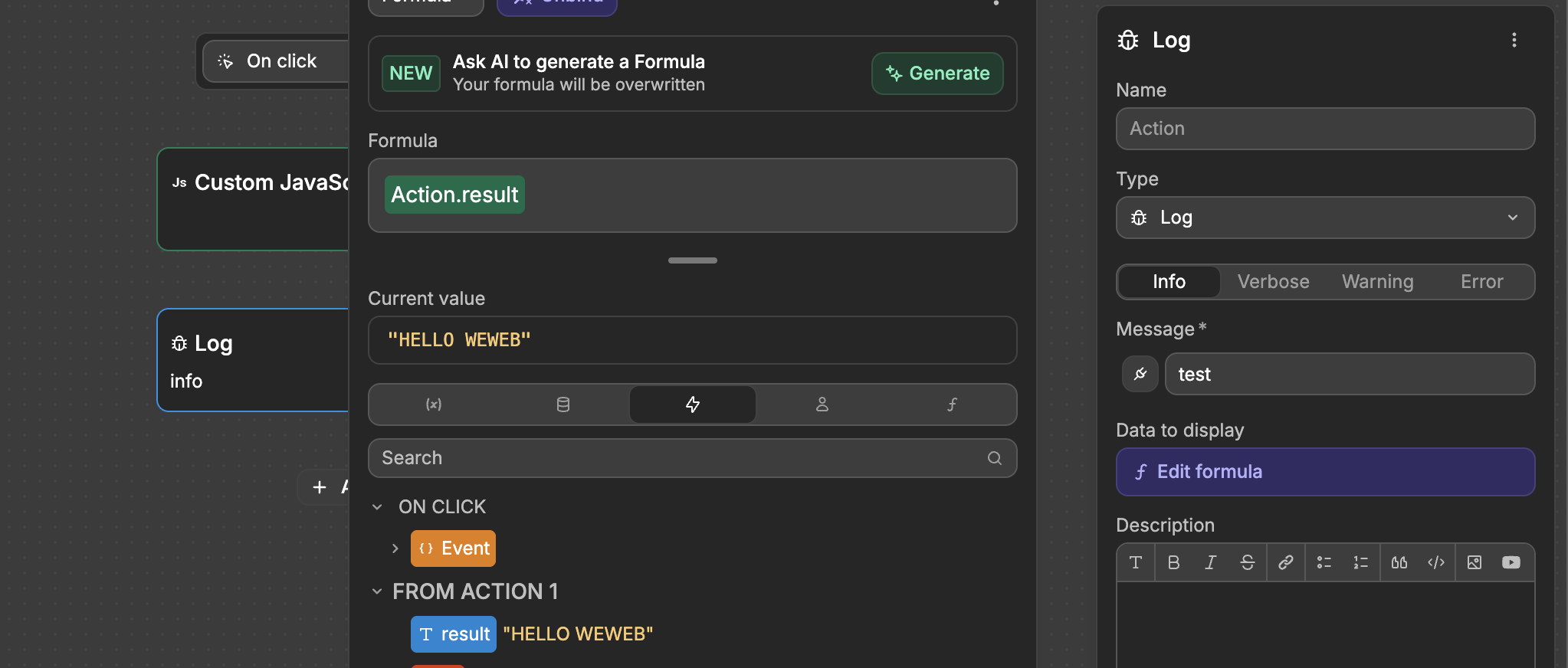
- Access variables and action results in workflows
- Return values for use in subsequent actions
- Use Node.js core modules for advanced server-side functionality
How to use
- Add the
Custom JavaScriptaction to your logic - Write your JavaScript code in the editor
- Use any variables from your project
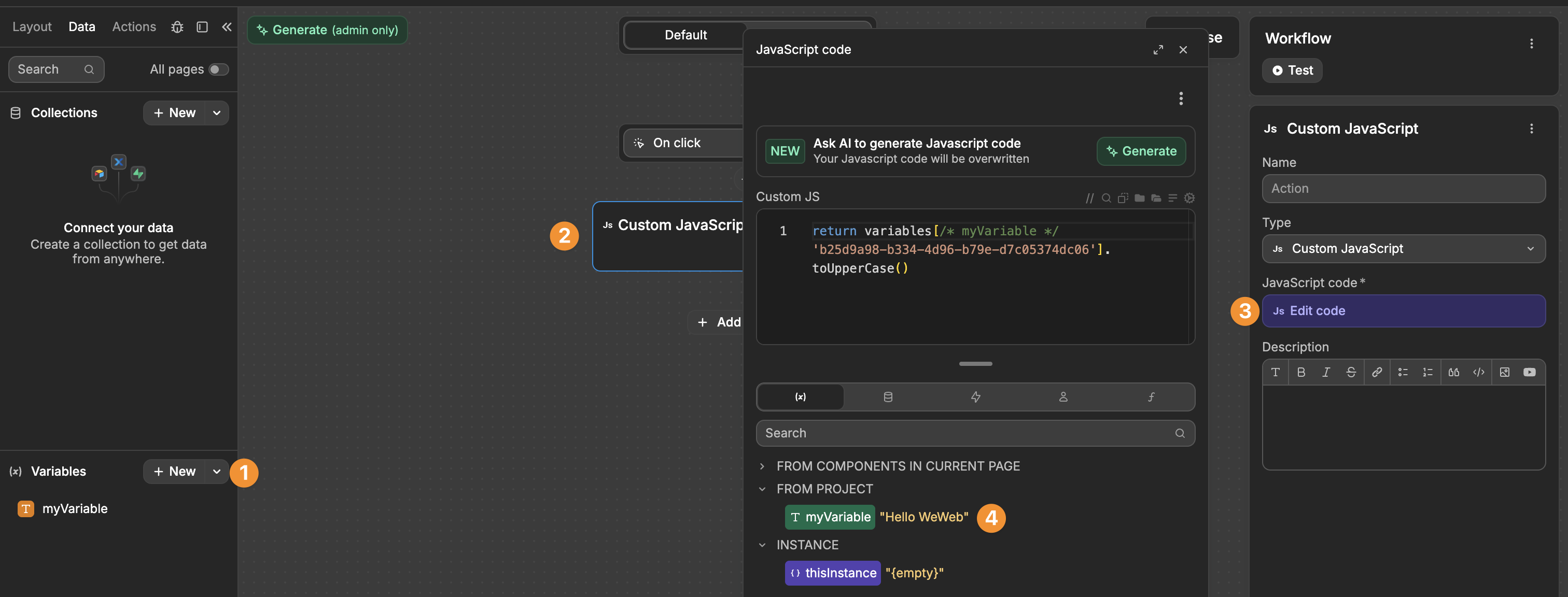
- Return any values you want to use in subsequent actions
Security benefits
Code in Custom Javascript actions in the Data & API tab run on the server, which means:
- You can safely access Secure environment variables
- Your code and logic are hidden from end users
- You can perform sensitive operations without exposing them to the interface
Available Node.js modules
When writing Custom JavaScript in the Data & API tab, you have access to Node.js core modules for advanced server-side functionality. These modules let you work with encryption, file operations, network requests, and more.
How to import modules
To use any Node.js module, you must import it using the await import() syntax with the module name:
javascript
// Generic syntax
const moduleName = await import("module-name");

// Examples
const crypto = await import("crypto");
const path = await import("path");
const fs = await import("fs");
After importing, you can use the module's methods and properties in your code.
Module reference
Here are all available Node.js modules with detailed explanations and examples:
assert
Test conditions and throw errors when they fail. Useful for validating data before processing.
Common uses: Data validation, input checking, debugging
javascript
const assert = await import("assert");

const userData = { name: "Alice", age: 25 };

// Validate data - will throw an error if false
assert.ok(userData.age >= 18, "User must be 18 or older");
assert.strictEqual(typeof userData.name, "string", "Name must be a string");

return { validated: true, user: userData };
buffer
Work with binary data, useful for encoding/decoding and handling files or API responses.
Common uses: Base64 encoding, binary data manipulation, file processing
javascript
const { Buffer } = await import("buffer");

const text = "Hello, WeWeb!";

// Encode to base64
const encoded = Buffer.from(text).toString('base64');

// Decode back to text
const decoded = Buffer.from(encoded, 'base64').toString('utf-8');

// Create buffer from array
const buffer = Buffer.from([72, 101, 108, 108, 111]);
const message = buffer.toString('utf-8');

return { original: text, encoded, decoded, message };
child_process
Execute system commands or spawn new processes. Useful for running external scripts or commands.
Common uses: Running system commands, executing scripts, batch processing
javascript
const { exec } = await import("child_process");
const util = await import("util");

// Convert callback-based exec to promise
const execPromise = util.promisify(exec);

// Run a simple command
const { stdout } = await execPromise('echo "Hello from child process"');

return { output: stdout.trim() };
cluster
Create multiple worker processes to handle load across CPU cores. Useful for scaling applications.
Common uses: Load balancing, multi-core processing, high-performance applications
javascript
const cluster = await import("cluster");
const os = await import("os");

const numCPUs = os.cpus().length;
const isMaster = cluster.isPrimary || cluster.isMaster;

return {
  isMaster,
  cpuCount: numCPUs,
  workerId: cluster.worker?.id || null
};
console
Standard console logging methods. Use for debugging your custom JavaScript.
Common uses: Debugging, logging information, development
javascript
const console = await import("console");

const data = { user: "Alice", action: "login", timestamp: Date.now() };

// Log for debugging (will appear in server logs)
console.log("Processing user action:", data);

return { logged: true, data };
constants
System-level constants for file operations, signals, and error codes.
Common uses: File permissions, system error codes, signal handling
javascript
const constants = await import("constants");

return {
  readOnly: constants.O_RDONLY,
  writeOnly: constants.O_WRONLY,
  readWrite: constants.O_RDWR,
  filePermissions: {
    ownerRead: constants.S_IRUSR,
    ownerWrite: constants.S_IWUSR
  }
};
crypto
Generate secure random values, create hashes, encrypt/decrypt data. Essential for security operations.
Common uses: Password hashing, unique IDs, data encryption, API signatures
javascript
const crypto = await import("crypto");

// Generate unique identifier
const uuid = crypto.randomUUID();

// Create hash
const hash = crypto.createHash('sha256').update('my-data').digest('hex');

// Generate random bytes
const randomBytes = crypto.randomBytes(16).toString('hex');

// Create HMAC signature
const hmac = crypto.createHmac('sha256', 'secret-key')
  .update('data-to-sign')
  .digest('hex');

return { uuid, hash, randomBytes, hmac };
dgram
Send and receive UDP datagrams. Useful for UDP-based protocols and networking.
Common uses: UDP communication, network protocols, real-time data
javascript
const dgram = await import("dgram");

const socket = dgram.createSocket('udp4');

// Get socket information
const socketType = socket.type;

socket.close();

return { socketType, message: "UDP socket created and closed" };
dns
Look up domain names and resolve IP addresses.
Common uses: Domain validation, IP lookup, DNS queries
javascript
const dns = await import("dns/promises");

// Look up IP address for a domain
const addresses = await dns.resolve4('google.com');

// Reverse lookup
const hostnames = await dns.reverse(addresses[0]);

return {
  domain: 'google.com',
  ipAddresses: addresses,
  reverseHostnames: hostnames
};
domain
Handle errors from multiple asynchronous operations as a group (deprecated but still available).
Common uses: Error handling for async operations
javascript
const domain = await import("domain");

const d = domain.create();

return {
  domainActive: !!d,
  message: "Domain created for error handling"
};
events
Create and manage event emitters for custom event-driven code.
Common uses: Custom events, pub/sub patterns, event-driven architecture
javascript
const { EventEmitter } = await import("events");

const emitter = new EventEmitter();

const results = [];

// Set up listener
emitter.on('data', (data) => {
  results.push(data);
});

// Emit events
emitter.emit('data', { value: 100 });
emitter.emit('data', { value: 200 });

return { events: results };
fs
Read, write, and manage files and directories.
Common uses: File operations, reading configurations, temporary files
javascript
const fs = await import("fs/promises");
const os = await import("os");
const path = await import("path");

// Create a temporary file
const tmpDir = os.tmpdir();
const tmpFile = path.join(tmpDir, 'weweb-temp.txt');

await fs.writeFile(tmpFile, 'Hello from WeWeb!');
const content = await fs.readFile(tmpFile, 'utf-8');
await fs.unlink(tmpFile);

return { content, message: "File created, read, and deleted" };
http
Create HTTP servers and make HTTP requests.
Common uses: HTTP servers, custom request handling
javascript
const http = await import("http");

// Create a simple request options object
const options = {
  hostname: 'api.example.com',
  port: 80,
  path: '/data',
  method: 'GET'
};

return {
  message: "HTTP module loaded",
  exampleOptions: options
};
http2
Work with HTTP/2 protocol for improved performance.
Common uses: HTTP/2 connections, modern web protocols
javascript
const http2 = await import("http2");

const constants = http2.constants;

return {
  http2Available: true,
  statusOK: constants.HTTP_STATUS_OK,
  statusNotFound: constants.HTTP_STATUS_NOT_FOUND
};
https
Make secure HTTPS requests and create HTTPS servers.
Common uses: Secure API calls, HTTPS servers
javascript
const https = await import("https");

return {
  message: "HTTPS module loaded",
  protocol: "https",
  defaultPort: 443
};
inspector
Debug and inspect running Node.js code.
Common uses: Debugging, performance profiling
javascript
const inspector = await import("inspector");

const url = inspector.url();

return {
  inspectorAvailable: true,
  inspectorUrl: url || "No active session"
};
module
Work with Node.js module system internals.
Common uses: Module resolution, dynamic imports
javascript
const module = await import("module");

const builtinModules = module.builtinModules;

return {
  availableModules: builtinModules.slice(0, 10),
  totalBuiltinModules: builtinModules.length
};
net
Create TCP servers and clients for network communication.
Common uses: TCP connections, network services, socket programming
javascript
const net = await import("net");

const server = net.createServer();

// Check if IPv6 is supported
const isIPv6 = net.isIPv6('::1');
const isIPv4 = net.isIP('192.168.1.1');

server.close();

return { isIPv6, isIPv4Type: isIPv4 };
os
Get information about the operating system and hardware.
Common uses: System info, environment detection, resource checking
javascript
const os = await import("os");

return {
  platform: os.platform(),
  architecture: os.arch(),
  cpuCount: os.cpus().length,
  totalMemory: os.totalmem(),
  freeMemory: os.freemem(),
  uptime: os.uptime(),
  hostname: os.hostname()
};
path
Work with file and directory paths in a cross-platform way.
Common uses: Path manipulation, file paths, directory traversal
javascript
const path = await import("path");

const filePath = '/users/documents/reports/report.pdf';

return {
  directory: path.dirname(filePath),
  filename: path.basename(filePath),
  filenameWithoutExt: path.basename(filePath, '.pdf'),
  extension: path.extname(filePath),
  joined: path.join('folder', 'subfolder', 'file.txt'),
  normalized: path.normalize('/users//documents/../reports/./report.pdf')
};
perf_hooks
Measure performance and track timing of operations.
Common uses: Performance monitoring, timing operations, benchmarking
javascript
const { performance } = await import("perf_hooks");

const start = performance.now();

// Simulate some work
let sum = 0;
for (let i = 0; i < 1000000; i++) {
  sum += i;
}

const end = performance.now();
const duration = end - start;

return {
  calculatedSum: sum,
  durationMs: duration,
  message: `Operation took ${duration.toFixed(2)}ms`
};
process
Access information about the current Node.js process and environment.
Common uses: Environment variables, process info, platform detection
javascript
const process = await import("process");

return {
  nodeVersion: process.version,
  platform: process.platform,
  architecture: process.arch,
  execPath: process.execPath,
  pid: process.pid,
  uptime: process.uptime()
};
punycode
Encode and decode Punycode (used for internationalized domain names).
Common uses: International domain names, unicode handling
javascript
const punycode = await import("punycode");

const unicodeDomain = 'mañana.com';
const asciiDomain = 'xn--maana-pta.com';

return {
  encoded: punycode.toASCII(unicodeDomain),
  decoded: punycode.toUnicode(asciiDomain)
};
querystring
Parse and format URL query strings.
Common uses: URL parameter handling, query string manipulation
javascript
const querystring = await import("querystring");

const queryString = 'name=John&age=30&city=Paris&tags=developer&tags=nodejs';
const parsed = querystring.parse(queryString);

const object = { product: 'Widget', price: 29.99, inStock: true };
const stringified = querystring.stringify(object);

return { parsed, stringified };
readline
Read input line by line from streams.
Common uses: Processing text files, parsing logs, line-by-line input
javascript
const readline = await import("readline");
const { Readable } = await import("stream");

const text = "Line 1\nLine 2\nLine 3";
const stream = Readable.from(text);

const rl = readline.createInterface({
  input: stream,
  crlfDelay: Infinity
});

const lines = [];
for await (const line of rl) {
  lines.push(line);
}

return { lines, totalLines: lines.length };
repl
Create an interactive Read-Eval-Print Loop.
Common uses: Interactive shells, debugging interfaces
javascript
const repl = await import("repl");

return {
  replAvailable: true,
  message: "REPL module loaded"
};
stream
Process large amounts of data efficiently using streams.
Common uses: Large file processing, data transformation, piping data
javascript
const { Readable, Transform } = await import("stream");

// Create a readable stream
const data = ['apple', 'banana', 'cherry'];
const readable = Readable.from(data);

// Collect all chunks
const chunks = [];
for await (const chunk of readable) {
  chunks.push(chunk.toUpperCase());
}

return { original: data, transformed: chunks };
string_decoder
Decode Buffer objects to strings properly handling multi-byte characters.
Common uses: Text decoding, handling UTF-8 data, buffer conversion
javascript
const { StringDecoder } = await import("string_decoder");
const { Buffer } = await import("buffer");

const decoder = new StringDecoder('utf8');

// Create buffer with multi-byte character
const buffer = Buffer.from('Hello 👋', 'utf8');

// Decode properly
const decoded = decoder.write(buffer);
const remaining = decoder.end();

return { decoded, remaining, length: decoded.length };
timers
Schedule functions to run after a delay or at intervals.
Common uses: Delays, scheduled tasks, timeout operations
javascript
const timers = await import("timers/promises");

const start = Date.now();

// Wait for 1 second
await timers.setTimeout(1000);

const elapsed = Date.now() - start;

return {
  message: "Waited 1 second",
  elapsedMs: elapsed
};
tls
Create secure TLS/SSL connections.
Common uses: Secure connections, certificate handling, encryption
javascript
const tls = await import("tls");

return {
  tlsAvailable: true,
  defaultCiphers: tls.DEFAULT_CIPHERS,
  message: "TLS module loaded for secure connections"
};
trace_events
Trace Node.js execution for performance analysis.
Common uses: Performance analysis, debugging, tracing
javascript
const trace_events = await import("trace_events");

return {
  traceEventsAvailable: true,
  message: "Trace events module loaded"
};
tty
Work with terminal/TTY streams.
Common uses: Terminal detection, TTY operations
javascript
const tty = await import("tty");

return {
  ttyAvailable: true,
  message: "TTY module loaded"
};
url
Parse, format, and manipulate URLs.
Common uses: URL parsing, query parameters, URL construction
javascript
const { URL, URLSearchParams } = await import("url");

const myUrl = new URL('https://example.com/path?name=Alice&age=30');

// Parse URL
const urlInfo = {
  protocol: myUrl.protocol,
  hostname: myUrl.hostname,
  pathname: myUrl.pathname,
  search: myUrl.search
};

// Work with query parameters
const params = new URLSearchParams(myUrl.search);
params.set('newParam', 'value');

return {
  urlInfo,
  allParams: Object.fromEntries(params),
  updatedUrl: `${myUrl.origin}${myUrl.pathname}?${params.toString()}`
};
util
Utility functions for formatting, promisifying, and inspecting data.
Common uses: Promise conversion, data formatting, debugging
javascript
const util = await import("util");

const data = {
  user: { name: 'Alice', age: 30 },
  nested: { level: { deep: 'value' } }
};

// Format data for debugging
const formatted = util.inspect(data, { depth: null, colors: false });

// Check types
const isDate = util.types.isDate(new Date());
const isArray = util.types.isTypedArray(new Uint8Array());

return {
  formatted,
  typeChecks: { isDate, isArray }
};
v8
Access V8 JavaScript engine information and control.
Common uses: Memory statistics, V8 configuration, heap analysis
javascript
const v8 = await import("v8");

const heapStats = v8.getHeapStatistics();

return {
  totalHeapSize: heapStats.total_heap_size,
  usedHeapSize: heapStats.used_heap_size,
  heapSizeLimit: heapStats.heap_size_limit,
  v8Version: process.versions.v8
};
vm
Run JavaScript code in an isolated context.
Common uses: Sandboxed code execution, secure evaluation
javascript
const vm = await import("vm");

const sandbox = { x: 10, y: 20 };
const script = new vm.Script('x + y');

const result = script.runInNewContext(sandbox);

return {
  calculation: 'x + y',
  result,
  sandbox
};
worker_threads
Create and manage worker threads for parallel execution.
Common uses: CPU-intensive tasks, parallel processing, multi-threading
javascript
const { isMainThread, threadId } = await import("worker_threads");

return {
  isMainThread,
  currentThreadId: threadId,
  message: "Worker threads module loaded"
};
zlib
Compress and decompress data using gzip, deflate, and brotli.
Common uses: Data compression, file compression, API responses
javascript
const zlib = await import("zlib");
const { Buffer } = await import("buffer");
const util = await import("util");

const gzip = util.promisify(zlib.gzip);
const gunzip = util.promisify(zlib.gunzip);

const originalData = "This is some data to compress!";
const buffer = Buffer.from(originalData);

// Compress
const compressed = await gzip(buffer);

// Decompress
const decompressed = await gunzip(compressed);
const result = decompressed.toString();

return {
  original: originalData,
  originalSize: buffer.length,
  compressedSize: compressed.length,
  decompressed: result,
  compressionRatio: (compressed.length / buffer.length * 100).toFixed(2) + '%'
};
Combining multiple modules
You can import and use multiple modules together in the same action:
javascript
const crypto = await import("crypto");
const { Buffer } = await import("buffer");
const path = await import("path");
const os = await import("os");

// Generate a unique filename
const uuid = crypto.randomUUID();
const timestamp = Date.now();
const filename = `report-${timestamp}-${uuid}.pdf`;

// Encode some data
const reportData = JSON.stringify({
  title: "Monthly Report",
  date: new Date().toISOString(),
  generated: true
});
const encoded = Buffer.from(reportData).toString('base64');

// Build file path
const directory = path.join('reports', '2024', 'december');
const fullPath = path.join(directory, filename);

// Get system info
const systemInfo = {
  platform: os.platform(),
  hostname: os.hostname()
};

return {
  filename,
  path: fullPath,
  encodedData: encoded,
  dataSize: Buffer.from(reportData).length,
  systemInfo
};