

Appearance
True/False split
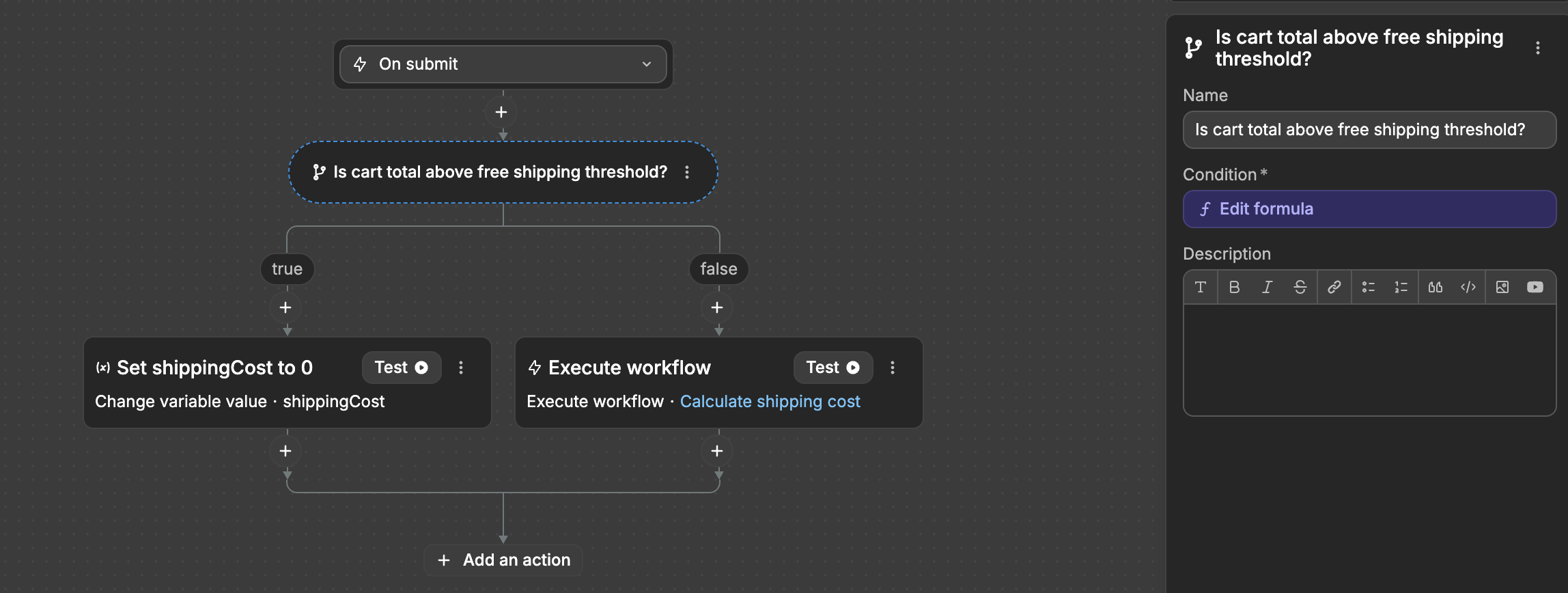
The True/False split action splits your API Endpoint into two paths based on a condition:
- If condition is true, executes the "True" branch
- If condition is false, executes the "False" branch
How it works
At its core, this action evaluates a condition you define - a value or formula that returns either true or false. The condition can compare values, check variables, or use any valid dynamic expression from your application.
Configuration
In the action configuration panel, you define the condition that will be evaluated. This can be:
- A direct boolean value
- A comparison (e.g.,
inputs.age >= 18) - A formula that returns true or false
- A variable that contains a boolean value
Common use cases in API Endpoints
- Input validation — Check if required inputs are provided before continuing
- Permission checks — Verify user permissions before allowing an operation
- Data conditions — Route logic based on record states or values
- Error handling — Check error flags and route to different responses
Example: Input validation
plaintext
├── Condition: inputs.email is empty
│     ├── True branch: Send error response "Email is required"
│     └── False branch: Continue with email processing
Example: Permission check
plaintext
├── Condition: currentUser.roles contains "admin"
│     ├── True branch: Execute admin operations
│     └── False branch: Send 403 error response
WHEN TO USE
Use True/False split when you have exactly two possible paths. If you need to handle multiple conditions, consider using Multi-option split instead.
CONTINUE LEARNING
Learn how to handle multiple conditional paths in your workflows.