

Appearance
Page metadata
Page metadata is the information that is used by search engines to display your page in search results. Search engines use metadata to understand your pages. Without proper metadata, search engines would have to guess what your page is about - leading to confusing or unhelpful search results.
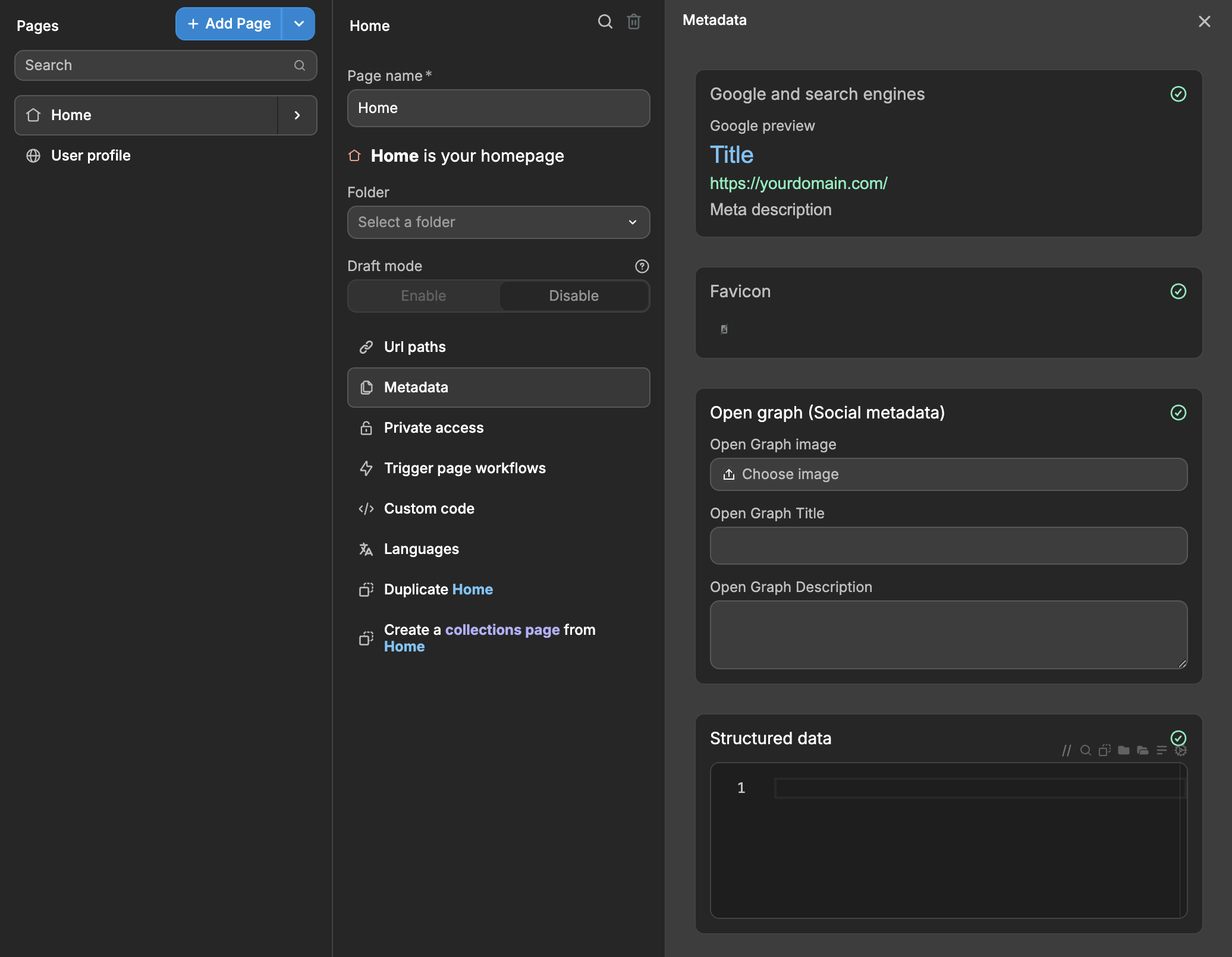
Accessing page metadata
To configure metadata for a specific page:
- Open the
Pagespanel in theInterfacetab - Click on the page you want to configure
- Click on
Metadatain the page menu - Configure the metadata settings for that page
TIP
The present article explains how to add static metadata to a WeWeb page.
If you need to learn how to set dynamic metadata on a page, please refer to this guide.
Google and search engines
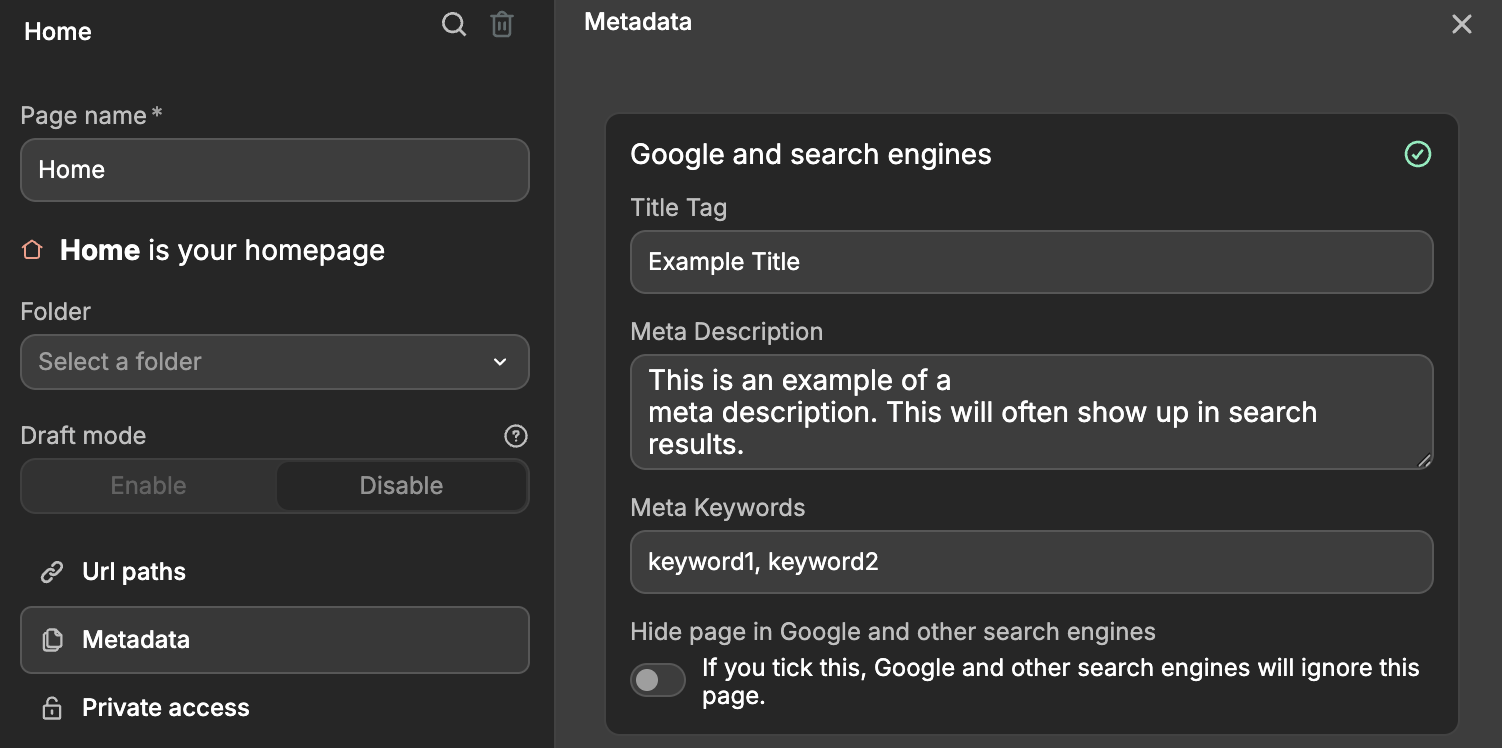
Title Tag
The Title Tag helps Google understand your page's main topic and determines how your page appears in search results. It's the first thing both Google and users see, serving as the clickable headline in search results. This also determines the title displayed in the browser tab.
TIP
- Include your main keyword near the beginning
- Keep it under 60 characters to avoid truncation in search results
- Make it descriptive but concise
- Make it unique for each page
- Write for humans first - make it compelling and clickable
Meta description
The meta description provides a brief summary of your page content that appears beneath the title in search results. While not directly used for ranking, it acts as a "pitch" to users, helping them decide whether to click on your result. A compelling meta description that accurately previews your page content can significantly increase click-through rates from search results.
TIP
- Length: Keep it between 150-160 characters to avoid truncation in search results
- Content: Include your main keywords naturally, accurately describe the page content
- Action: Include a clear call-to-action when appropriate
- Unique: Write different meta descriptions for each page
- Style: Write in active voice and make it compelling to click
Meta keywords
Meta keywords are searchable terms you can add to your page. While they don't affect rankings on major search engines like Google, they can help with internal site search and are sometimes used by specialized industry tools. For best SEO results, focus instead on creating good titles, descriptions, and content with naturally integrated keywords.
Hide page from search engines
If you enable this option to hide the page from Google and other search engines, the page will not be indexed by search engines.
TIP
Indexing is the process where search engines store and organize web pages after scanning their content. This allows them to quickly retrieve relevant pages when users search. If a page isn’t indexed, it won’t appear in search results.
Favicon
This is the icon that will be displayed in the browser tab.
Technical specifications:
- Must be square (1:1 aspect ratio)
- Minimum size: 8×8 pixels
- Recommended size: At least 48×48 pixels
- Any valid favicon format is accepted
- URL must be stable (avoid frequent changes)
TIP
The favicon can only be set on your homepage and will apply to all pages of your web app. Having a single source of truth (the homepage) makes it easier for Google to track and update favicon information. This also improves crawling efficiency, as Google's crawlers don't need to check every page for favicon information.
Open graph (Social metadata)
Open Graph image
This is the image that will be displayed when you share the page on social media. It should be in a specific format, such as aspect ratio: 1.91:1 and minimum dimensions: 1200x630 pixels. For further details, click here.
Open Graph Title
This is the title that will be displayed when you share the page on social media. More info on how to set it up here.
Open Graph Description
This is the description that will be displayed when you share the page on social media. More info on how to set it up here.
Structured data
Structured data is like a special label system for your website that helps search engines (like Google) better understand what's on your pages. Think of it as giving Google a clear set of instructions about your content - whether it's a product page, an article, a recipe, or just your company information.
Search engines use structured data to create rich descriptions that display extra details like ratings, images, or prices, ultimately increasing the chances of users clicking on your site.
In WeWeb, structured data can be added through the page metadata settings (accessible via the Pages panel → select a page → Metadata). The format should be JSON-LD, which might look intimidating but it's just a standardized way to organize information.
Here's what you need to know:
- It must be valid JSON-LD format
- The content should match what's actually visible on your page
For example, if you're adding structured data for your company page, you might include:
- Your company name
- Address
- Contact information
- Type of business
- Logo
typescript
{
  "@context": "https://schema.org",
  "name": "Sweet Dreams Bakery",
  "address": {
    "@type": "PostalAddress",
    "streetAddress": "123 Main Street",
    "addressLocality": "San Francisco",
    "addressRegion": "CA",
    "postalCode": "94105",
    "addressCountry": "US"
  },
  "telephone": "+1-555-123-4567",
  "email": "hello@sweetdreamsbakery.com",
  "@type": "Bakery",
  "image": "https://sweetdreamsbakery.com/logo.png"
}
TIP
Structured data should match the main content of each specific page.
- If it's a recipe page, you'll want to include recipe details (cooking time, ingredients, etc.)
- If it's a product page, you'll include product information (price, availability, etc.)
- If it's a business contact page, that's when you'd include business details (address, phone, etc.)