

Appearance
After Deploy Hook
An "After Deploy Hook" is a custom automation trigger that runs immediately after you deploy a WeWeb project. It sends a webhook to a specified URL with detailed context about the deployment, allowing you to automate post-deploy actions and integrate with external services.
What are After Deploy Hooks used for?
After Deploy Hooks are commonly used to:
- Notify external services (Slack, Discord, Microsoft Teams, CI/CD tools)
- Sync with other systems in your development workflow
- Trigger downstream processes like QA workflows
- Send notifications to team members or stakeholders
Setting up an After Deploy Hook
To configure an After Deploy Hook for your project:
Access Project Settings
- Navigate to your project dashboard
- Click on the
Settingstab in the top navigation
Configure the After Deploy Hook
- In the
After deploy hooksection, clickEdit info - Enter the webhook URL where you want to receive deployment notifications
- Click
Saveto save your settings
- In the
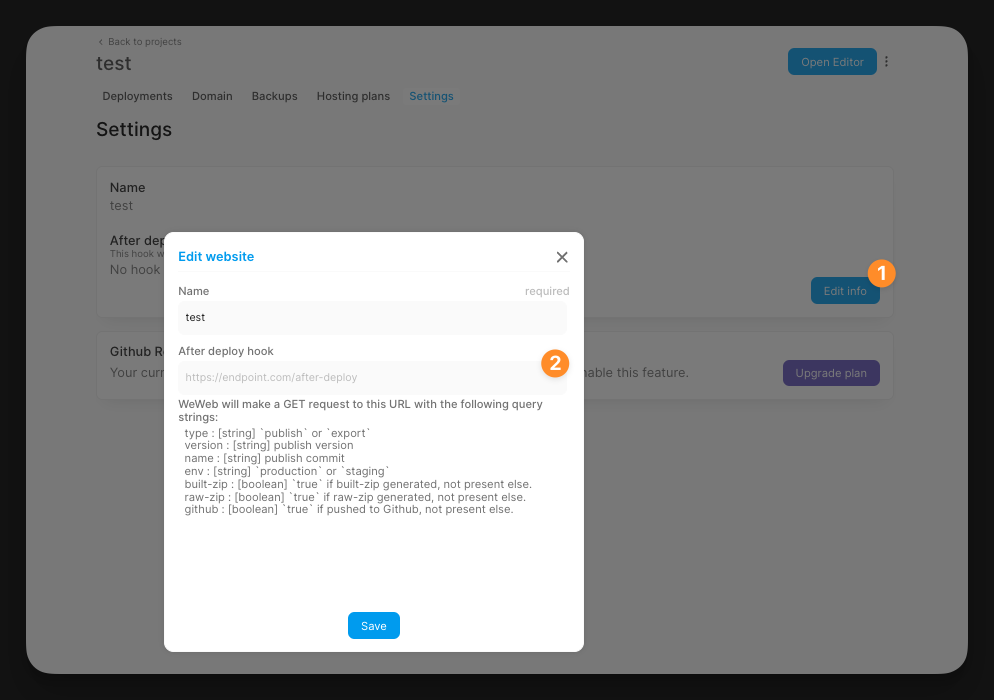
Webhook Request
When your project is deployed, WeWeb will make a GET request to your specified URL with query parameters containing deployment information.
Example URL
https://endpoint.com/after-deploy?type=publish&version=1.2.3&name=feature-release&env=production&built-zip=true&raw-zip=false&github=trueQuery Parameters
type: Either 'publish' or 'export'version: The publish versionname: The publish commit nameenv: Either 'production' or 'staging'built-zip: Boolean indicating if a built zip was generatedraw-zip: Boolean indicating if a raw zip was generatedgithub: Boolean indicating if the code was pushed to GitHub
Use Cases and Examples
Slack/Discord Notifications: Set up your webhook endpoint to parse the query parameters and send a formatted message to your team's Slack channel or Discord server. You can include the version, environment, and deployment type in the notification.
Email Alerts: Configure your endpoint to send email notifications to stakeholders when env=production, alerting them about production deployments with the version and commit name.
QA Testing Triggers: When your endpoint receives a request with env=staging, automatically trigger your QA team's testing workflow so they know a new version is ready for review.